Your phone already does something like this for location access. Every so often it tells you an app still has permission, mentions that the app hasn’t used it in weeks, and asks if you want to keep it that way.
AI agent permissions need the same nudge, and so far they haven’t had one. Someone writes a policy once. They go tool by tool and decide what the agent can do on its own, what waits for a human, and what’s blocked. Then the policy stays the same while the agent’s real behavior changes around it.
Policy Studio, ArmorIQ’s policy editor, now closes that gap. Under every rule there’s one short line showing how often the agent used that tool in the last 30 days, and how the human approvals on it went.
What you see
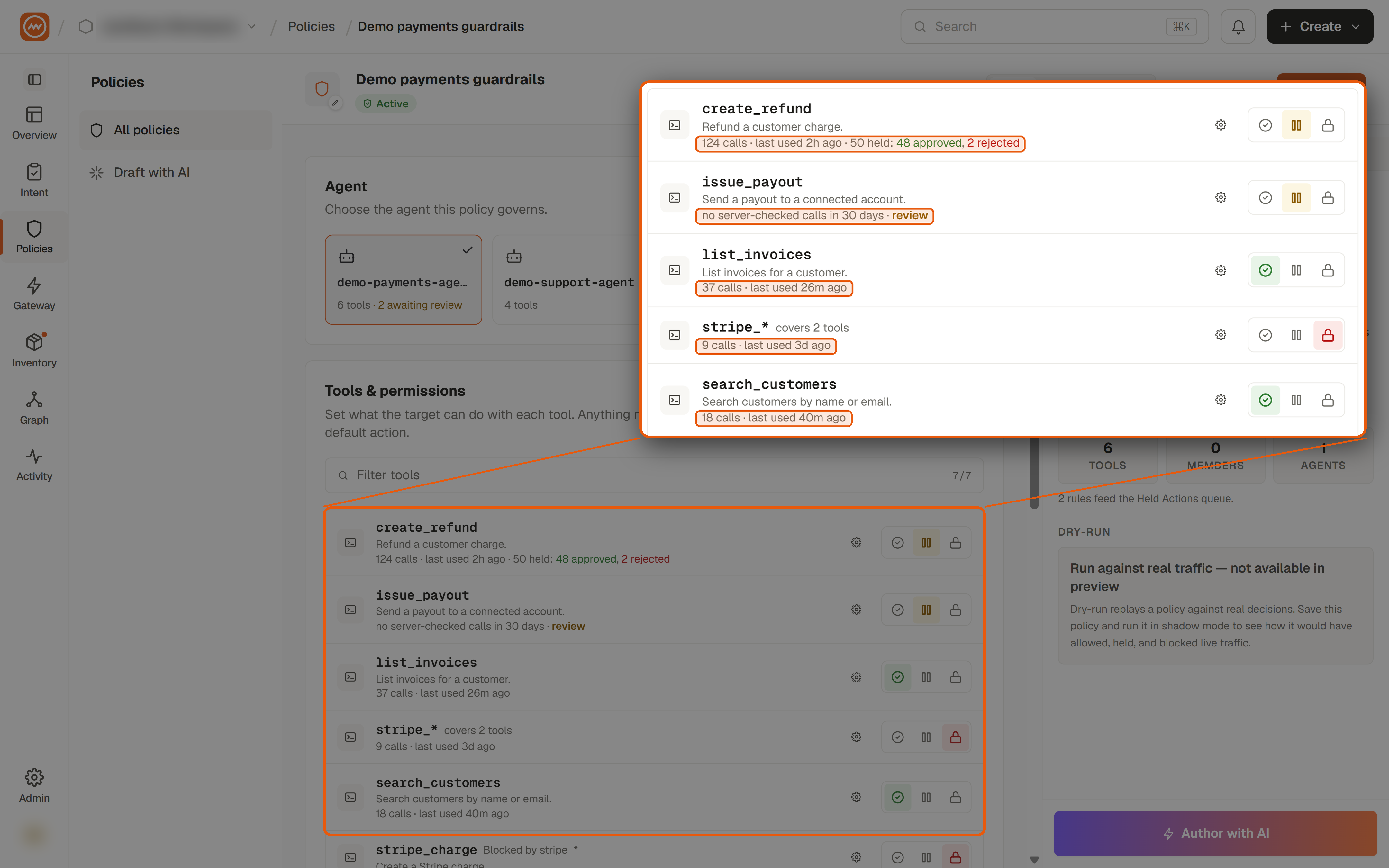
Here’s part of a policy from our demo workspace (demo data, not a customer’s):
create_refund: 124 calls · last used 2h ago · 50 held: 48 approved, 2 rejectedissue_payout: no server-checked calls in 30 days · reviewlist_invoices: 37 calls · last used 26m ago
list_invoices is the healthy case. The agent uses it regularly and there’s nothing to decide.
issue_payout is the one that should make an admin stop and look. The agent is allowed to send payouts and hasn’t sent one in a month. It’s a live permission with no job.
create_refund is a different kind of signal. Humans approved 48 of the 50 refunds that were held for review. At that rate, holding the refund has become one more click. The rule might work better as an allow with conditions, so only the unusual refunds go to a person.
The same line appears on wildcard rules, so a single rule covering every stripe_* tool shows usage across all of them. It appears on the policy’s default action too.
Why it belongs in the editor
None of this data is new. It lived in logs and dashboards, which are the last places anyone looks while editing a policy. Finding an unused permission used to mean opening the logs in one tab and the policy in another and matching tool names by hand. Most people, reasonably, never did.
That matters because these two patterns slowly weaken a careful policy, and nobody ever decides they should. An unused permission is authority the agent holds but doesn’t need. Nothing happens with it, so nobody looks at it, and it stays granted indefinitely. A hold that’s approved almost every time fails the other way. People see it so often that approving becomes muscle memory, and the one refund that should have been rejected goes through with the other 48. Looking at the policy alone, you can’t see either problem. Put a month of usage under each rule and both are hard to miss.
What it deliberately doesn’t do
It never changes a policy. An unused tool is marked “review,” never “block.” Studio puts the evidence next to the rule, and the admin decides.
It counts calls and approval outcomes. It doesn’t show what was inside those calls.
The numbers are labeled “server-checked,” and the label matters. They cover calls that ArmorIQ’s server evaluated. Some agents decide certain calls locally, and those aren’t in the counts yet. When a tool shows zero, the label tells you exactly what that zero covers.
If usage data isn’t available, the editor looks and works the way it always has.
The bigger shift
Writing a policy used to be a setup task: get it right on day one and hope it stays right. With observed behavior next to each rule, the policy becomes something you come back to, and you have a reason to. Remove what the agent no longer uses. Relax the holds people approve without thinking. Keep the ones that actually catch things.
More soon.